
Wardogs ESP: Find Enemies Around the Control Zone
Wardogs ESP helps you find infantry before the normal view gives away their position. A player behind a structure can threaten the approach while another moves outside the part of the screen you're watching. Knowing where that pressure is coming from gives you more to work with than assuming every piece of cover is empty.
The reason to look for Wardogs ESP is usually concrete: you want to see the opponent who is about to catch you crossing or entering the fight. Our Wardogs cheats include products with visuals, and the internal cheat separates players from placed threats and supplies. This article centres on enemy positions rather than repeating the existing loot guide.
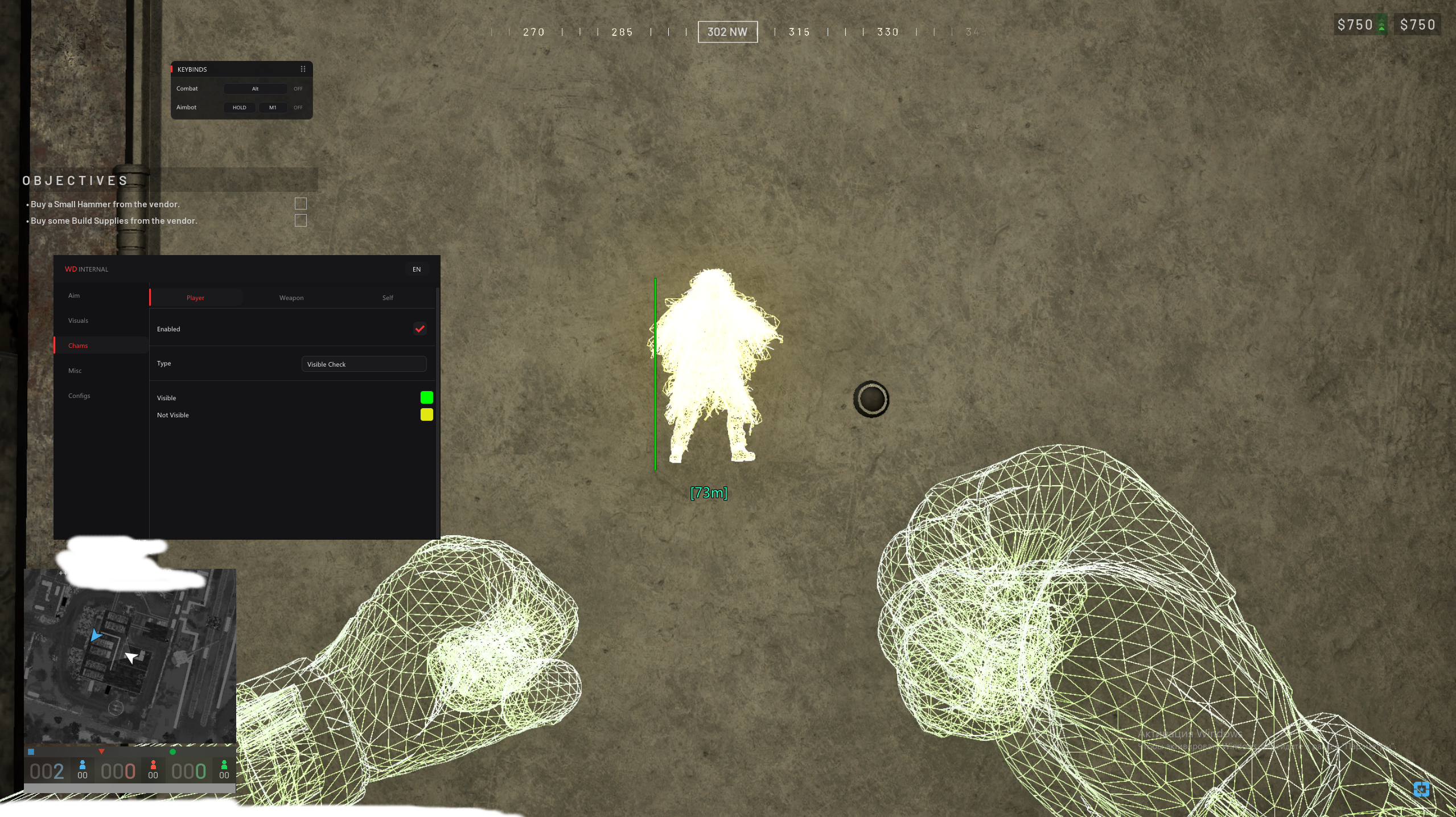
The next structure can hide several different threats
Player ESP shows information about the infantry player rather than simply colouring the whole scene. Wardogs ESP can include a Skeleton or Head Circle in the internal cheat, which helps locate the character within the visual display. That makes the opponent easier to place when cover breaks up the outline you would otherwise be trying to see.
Wardogs wallhacks is a common description for seeing opponents through cover. Wardogs ESP can give you that positional read without requiring every character to use the same display style. It is still information about the location. Seeing the player doesn't change the route between you or establish that a weapon can fire through the structure.
Faction and distance explain who is close to you
Faction ESP identifies a player's faction in the internal cheat's display. Wardogs ESP is more useful when the location comes with enough context to understand who you're looking at. A player close to your approach and another farther away can share the same part of your screen, so player distance helps distinguish the pressure they represent.
A health bar adds another piece of information about the player already shown. Wardogs ESP doesn't make that figure a guarantee about the next encounter, but it can help explain the opponent's condition at that moment. The useful read comes from the player and the context together, not from treating every visible marker as an identical threat.
Movement outside your view still matters
Off-screen arrows indicate players away from the current view in the internal cheat. Wardogs ESP can therefore draw attention to infantry you aren't facing, rather than limiting your awareness to the structure directly ahead. That matters when the fight changes position while you're concentrating on one approach. The arrow draws your attention to a direction.
View direction concerns where a displayed player is facing, while held item information concerns what they have in hand. Wardogs ESP can put those details alongside a position. They help you interpret what is shown, but the display doesn't choose an approach for you. A player looking one way can still turn as the encounter changes.
Placed explosives are separate from infantry
Claymore ESP marks claymores with name and distance information in the internal cheat. Wardogs ESP with that feature addresses a threat that can remain in place without an infantry player beside it. If your route depends on getting around a structure, the explosive's location needs to be read separately from the player marker you are watching.
Mine ESP names another placed threat. Wardogs ESP gives those objects their own indicators, so a marked mine on the approach needn't be mistaken for the infantry beyond it. A mine, a dropped item and an opponent have different relevance to the route. Keeping those subjects distinct makes the information useful instead of turning a crowded display into something you stop reading.
Supplies can explain a short detour
Ammo Crate ESP and Supply Crate ESP concern resupply locations. Wardogs ESP can show those objects separately from enemies, so you can see the supply you want without mistaking it for a player. That matters when you need to replenish ammunition while pressure remains nearby. The supply location doesn't establish that the surrounding route is clear.
Dropped Item ESP concerns items left in the world. Wardogs ESP with this function can help you spot an item you would otherwise search for around furniture or cover. Our loot article goes deeper into that subject. Here it matters because information about supplies and information about enemies can both affect the decision to leave your current position.
Read the fight without enabling every drawing option
Player Chams changes the rendering of the character, while Wardogs ESP can add player details to the screen. They are related visual benefits, but you don't need to describe them as the same feature. Wardogs PC cheats with player visuals can help you read infantry through cover, then recognise whether the nearby marker belongs to a player or a supply. The Wardogs Internal Cheat page contains the visuals covered here and the chams guide explains character rendering.
Wardogs hacks remain cheats even when your main interest is player information. Wardogs ESP can help you read an encounter, but it doesn't promise a win or protection from account bans. Use the aimbot article for the separate targeting benefit and the loot ESP guide when your question concerns supplies rather than infantry.
Wardogs Cheat Questions
Does faction information move my aim?
No. It adds information to the player display. Aimbot is the separate targeting function.
Are explosives part of Player ESP?
The internal cheat names claymore and mine visuals separately from player visuals. They represent different subjects.
Can I see an enemy and assume the route is clear?
No. A displayed position gives information about that player. It doesn't prove every part of the approach is safe or passable.