
Black Ops 7 Cheats - Best BO7 Cheats for PC
Compare Black Ops 7 cheats by looking at the controls you will actually use. The BO7 cheats here cover aiming, character visuals and a separate radar display. If you are searching for the best external cheat for BO7, start with the product requirements at ShxdowCheats. These cod Black Ops 7 cheats have a detailed feature list you can read before choosing a duration.
Why Players Use Black Ops 7 Cheats
A name and a weapon label can be more useful than a screen full of boxes. That is where I would start with Black Ops 7: decide what you want to see, then leave the rest out. The display is yours to arrange. There is no prize for enabling the longest list of markers.
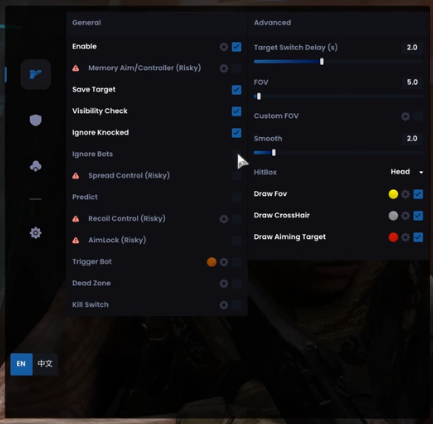
With the BO7 cheats, you have a choice of aim types and an override key. Bone selection picks the body part. The aim key is the button you use to activate targeting, while the delay changes when that activation takes effect. They are easy to confuse when you rush through the menu.
Looking for call of duty Black Ops 7 cheats? Open the requirements first. A great-looking video is not much use if the package does not suit your PC. The best BO7 cheats for your shortlist should have the features you actually want, with a compatibility list you can check. At ShxdowCheats, both are on the product page.
-frameat1m44s.jpg.54ca1c2ba4e8a99666a9c118d2297895.jpg)
There are two aim types on this cheats for BO7 listing: lock-on and trigger-bot. You also get an override key for a different body part. Read those names together with the bone selection and aim-key options. That tells you much more about the package than the word aimbot on its own.
One detail to catch when looking at Black Ops 7 cheats PC requirements: the spoofer has its own Windows limit. It is marked 23H2 and lower. The client being listed for Windows 10 and 11 does not extend that limit. If you are unsure which build you have, clear that up before ordering.
Which BO7 cheat would you actually use? Start there. Some players want a small radar window; others want names and weapon labels on the main view. When you compare the best BO7 cheats, look for those details instead of buying on the length of the feature list. The current access options are in the store.
Black Ops 7 Hack Features
-frameat0m55s.jpg.1784affac1cb5907a221597f05a5ed4a.jpg)
Aimbot Controls and Silent Aim
The product lists an aim key, an aim-key delay, aim lock and bone selection. Smoothing changes how ordinary aiming moves towards a target. It is a different control from Silent Aim. The Shxdow External listing does not list Silent Aim, so do not choose this package expecting that feature. Use the named controls to understand the aiming options.
-frameat1m6s.jpg.b6b7a58854f0b681d086a520c468b140.jpg)
ESP & Wallhack
Boxes, names and health bars are all available, along with skeletons and weapon labels. You can add distance as well. For someone outside the main view, there are off-screen indicators and proximity alerts. Keep the display readable. Once several labels overlap, you are spending your time sorting out the overlay instead of looking at the match.
What Makes These the Best BO7 Cheats?
ShxdowCheats lists Black Ops 7 hacks with the supported PC requirements, available controls and current product details.
Product Status
The spoofer is included, but its Windows restriction still applies. Read that line before choosing access. Product status can change after an update, too. Yesterday's label is only yesterday's label; it is not a reason to skip the current details.
BO7 Targeting Controls
The BO7 cheats include adjustable targeting options. That does not establish that they predict every animation or compensate for every movement pattern. Read the available controls rather than relying on an unlisted movement claim. For this BO7 cheat, the product page is the reference for what is included.
Setup Support
Stuck on a Black Ops 7 requirement or a menu option? Tell support which product you mean and where you got stuck. “BO7 on my PC” leaves a lot to guess. The Windows build and the wording of the error, if there is one, give them something useful to work with.
Black Ops 7 Cheats – Frequently Asked Questions
1 Are These Black Ops 7 Cheats Undetected?
There is no permanent undetected promise for the BO7 cheats. The current product status is the place to look, and it can change. An external client is still software you choose to use on your account. The included spoofer has its own requirements; it cannot promise an outcome for your account.
2 Which Aimbot Controls Are Listed?
The Black Ops 7 cheat lists bone selection, visibility checks, smoothing and aim-key controls. Those are the supported targeting options described here. The listing does not establish a particular prediction system for every movement animation, so we do not promise one.
3 What Is the Best External Cheat for BO7?
The best external cheat BO7 comparison depends on what you need from the product. Read the compatibility details, targeting controls and display options side by side. Shxdow External is described as an external client; that description alone does not establish that it is safer than another approach.
4 Can I Use BO7 Cheats in Ranked?
Ranked does not come with a safe setting for Black Ops 7 cheats PC users. Smoothing changes the aiming movement. A visibility check changes targeting. Neither turns the software into something the game permits. There is no percentage we can give you that guarantees your account will avoid action.
5 How Much Do Black Ops 7 Cheats Cost?
The current BO7 cheat price and available durations are shown on the store listing. Select the duration you want and read the terms shown there before checkout. Check the live listing for the amount you will pay.
How to Use Black Ops 7 Cheats
1 Purchase & Download
The BO7 package has duration options in the store. Choose the one you want and keep the order details somewhere you can find them. Bought another package here before? Keep that order separate. When you need help, the right product name saves a lot of back and forth.
2 Read the Product Instructions
Black Ops 7 is the game; Shxdow External is the package covered here. Keep that distinction in mind when looking through your files and instructions. You might have more than one CoD package on the same PC. Use the instructions that came with this one, and ask about anything that looks different on your system.
3 Configure In-Game
Want a cleaner ESP display? Pick a few details first: perhaps a name, a distance and a health bar. Then look at the targeting controls. Bone selection, the aim key and smoothing each have a different job. Once you have a layout you like, save it. That is easier than rebuilding it from memory.
4 Understand the Ranked Limits
Changing the aiming movement does not settle what happens to an account. Smoothing still has a practical purpose, but calling a particular percentage safe would be a claim we cannot make. The same applies to hiding visual markers. They change what you see. They do not grant an exception to the game rules.
Real Talk About Black Ops 7
1 Choose the Information You Need
Before choosing cheats for BO7, think about what you want from the display. Would you use names on the main screen, or keep a separate radar nearby? Would weapon labels help, or just add clutter? Those are practical differences you can compare on the feature list before deciding.
2 Check the Current Product Status
A status label has a date behind it, even when that date is not printed beside the word. BO7 can change, and so can the software it runs with. Check the current product information. A previous run without a problem does not establish what happens next.
3 Check the Listed Features
The cod Black Ops 7 cheats feature list covers targeting and visual information. It does not list a camo unlock service for this package. If that is what you are looking for, do not infer it from the name of the game or from an aiming demonstration.
4 Your Choice to Make
Compare the BO7 listing at ShxdowCheats with the requirements of your PC and the controls you want. Read the duration options and current price in the store. A short description is useful for an overview, but the product details are where you can check the limits before deciding.
For other Call of Duty options, see our Modern Warfare 4 cheats and Warzone cheats. View the related products and guides at the Call of Duty cheats hub.
-
Member Statistics
-
Featured Products
-
Shxdow BO7/MW4 Cheat (Inbuilt Spoofer)
Undetected (Online)
-
-
Who's Online (See full list)
