
How R6 Aimbot FOV and Hitboxes Work
An attacker appears in a doorway while another moves across the corridor behind them. Your crosshair is already near the first player, but the aimbot turns towards the second. That behaviour starts with target selection, and R6 aimbot FOV is one of the first things worth understanding. FOV defines the area where a target can qualify. It doesn't decide every part of the shot by itself.
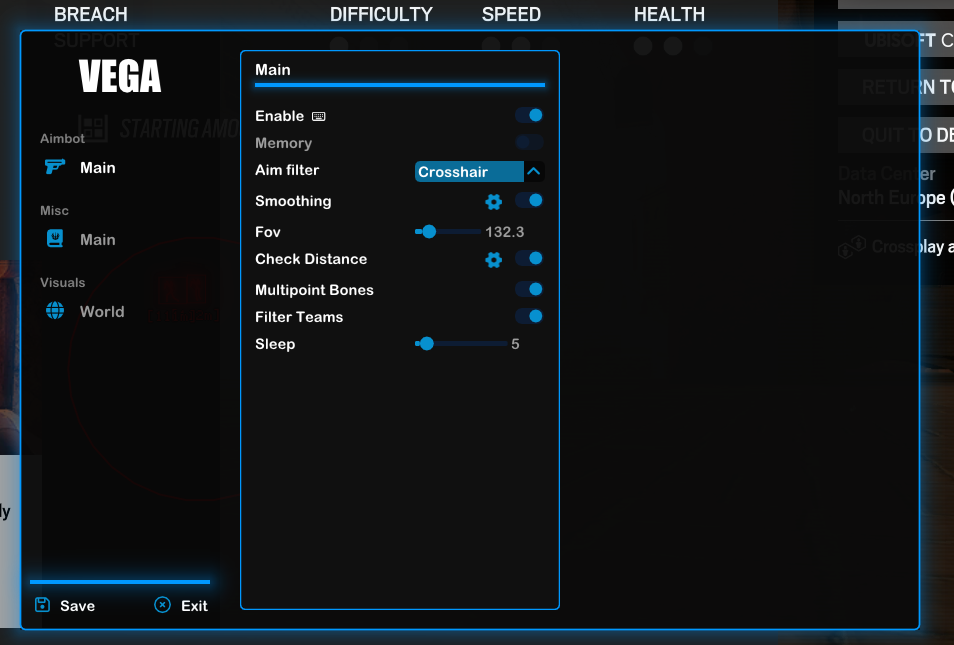
Our Rainbow Six Siege cheats include products with different aiming menus. Emerald lists FOV, hitboxes and sensitivity, while Vega lists smoothing, FOV control and multipoint bones. The names matter because an aim key, a target filter and an aiming point each have a different job. Knowing which one changes the behaviour saves you from blaming the wrong feature.
What Aimbot FOV Changes in Siege
R6 aimbot FOV limits how far from the centre of your aim a player can be considered. A smaller area excludes more of the room, while a larger area can include several operators at once. In Siege, where a defender may lean around a doorframe while another holds a deeper angle, that difference affects which threats enter the aimbot's selection process.
The FOV circle is a visual reference for that area when the cheat provides it. It isn't your game's camera field of view, and changing the camera doesn't necessarily change the aimbot radius in the same way. Treat them as separate features. An operator entering the circle still has to satisfy the other targeting checks before the R6 aimbot can select them.
How Aimbot Hitboxes Choose Where You Aim
Aimbot hitboxes determine the part of the target used for aiming. A head hitbox is a different aiming point from a chest hitbox, even when both belong to the same operator. The distinction becomes obvious when an enemy crouches behind furniture or leans through a narrow opening. Selecting an operator and choosing a point on that operator are two separate decisions.
R6 Emerald lists hitbox selection, while Vega uses the term multipoint bones. A named bone is an aiming reference on the character. It doesn't enlarge the game's hitbox or turn an obstructed body part into a clear shot through a reinforced wall. The useful question is which point the cheat selects when a defender's head and upper body are exposed by different amounts.
Why Smoothing and Sensitivity Feel Different
Aimbot smoothing affects how aim moves towards the selected point. FOV affects whether the target enters consideration at all. If the aim travels across the doorway more gradually but still chooses the wrong operator, smoothing hasn't addressed the selection problem. The same separation applies when you turn a corner and several defenders become eligible together.
Emerald names aimbot sensitivity in its feature list. Vega names smoothing. A number copied from one cheat isn't a reliable reference for another, because those controls don't necessarily use the same scale. Your mouse sensitivity also affects your own crosshair movement. A fast manual turn onto a doorway and a slower aimbot movement towards a defender can happen in the same exchange.
How Vega Filters Aimbot Targets
R6 Vega lists an aim filter using crosshair and distance, alongside a distance check and team filter. Crosshair distance concerns proximity to your current aim, while distance to the operator concerns their position in the map. An enemy close to your crosshair can still be much farther down a corridor than another enemy standing beside the door.
That distinction matters on long sightlines and layered rooms. A distance check can exclude a target before the selection rule chooses between the remaining operators. A team filter excludes teammates from that process. Neither replaces crosshair placement. You can already be holding the doorway at head height while a teammate passes nearby, and those separate checks determine which operators the R6 cheats can consider.
What to Check in the Emerald Aimbot Menu
The R6 Emerald cheat lists Active Aimbot, aim keys, FOV, hitboxes, sensitivity and Mark Target. Start by understanding the function of each name. The aim key controls activation, FOV narrows eligible targets and hitboxes determine the aiming point. Mark Target belongs to the display of the selected target, rather than the game's weapon damage.
R6 aimbot FOV matters because a single doorway can contain more than one eligible enemy, but it is only one part of aimbot targeting. A player may be inside the radius without being the target you intended to follow. Separate activation, selection and aim movement when you read the menu. You'll understand why the aim moved much faster than you would from copying a row of unexplained numbers.
R6 Aimbot Questions
Does R6 aimbot FOV change the game's camera FOV?
No. It controls the target selection area for the aimbot. Camera FOV controls how much of the game world you see. Their menus may use the same abbreviation, but they serve different purposes.
Are aimbot hitboxes the same as larger hitboxes?
No. Choosing an aiming point doesn't enlarge an operator's hitbox. Head, chest and other supported choices tell the aimbot where to aim on the character.
Can I copy the same aimbot numbers between Emerald and Vega?
Don't assume the values are equivalent. Their public feature lists use different names, and a matching number doesn't establish matching behaviour. Follow the explanation provided for the particular cheat.