
Wardogs Cheats That Help You Aim and Track Players
An infantry player crosses the doorway ahead while another moves somewhere beyond your view. Wardogs cheats can help with both parts of that fight: aiming at an eligible player and seeing where opponents are before you step forward. Shxdow offers an Internal Cheat, a Chams product and a Radar product. Start with the part of the encounter you want to change, then open the product that covers it.
Choose the advantage you need in an infantry fight
Wardogs hacks make the most sense when they answer a clear problem. If you lose the target as players cross your screen, ordinary aimbot controls are the relevant feature. If you need to see who is near a building, player ESP or chams will be more useful. If you want a wider view of enemy positions, radar addresses that instead. The three Shxdow products serve those needs in different ways.
These Wardogs PC cheats focus on visible, practical actions. The Internal Cheat combines aimbot, player ESP, object ESP, chams and No Recoil. The Chams product highlights players with faction colours. Radar gives you a wider enemy display and player counts. Wardogs cheats can therefore help you aim during a direct encounter or read player movement before you enter one.
Bring your crosshair onto the player you mean to fight
A Wardogs aimbot helps move your crosshair towards an eligible infantry player. The Internal Cheat lets you set an aim FOV, speed and smoothness, then choose closest, head, neck or chest as the target bone. Wardogs cheats with those controls are useful when a player changes direction or moves past another opponent. You still choose when to activate aim with the keybind and which opening is worth taking.
Target selection matters as much as movement. The Internal Cheat has a target filter, target switch delay, visible check and maximum distance. Wardogs cheats can therefore be set to consider a nearer visible player instead of treating every person on the screen as the same target. Stickiness is also named among the controls when you want aim to stay with the selected player. The Wardogs aimbot guide covers those aiming questions in more detail.
Smoothness makes ordinary crosshair movement more gradual, while speed is a separate control. Wardogs hacks built around this aim behaviour help you acquire the player in front of you. When another opponent is moving near the building, you can read their position through the Internal Cheat's player ESP instead of waiting for them to cross your sightline.
Keep recoil separate from aim selection
Wardogs no recoil is also named on the Internal Cheat page. It concerns weapon movement while you fire, whereas the aimbot selects and follows an eligible player. If Wardogs recoil control is your main question, the no recoil guide explains that narrower firing benefit. A steadier weapon view is helpful during a sustained burst, but it is not a substitute for recognising the player you need to engage.
See infantry and objects with ESP
Wardogs ESP in the Internal Cheat can show a player's skeleton, head circle, view direction, health, faction, distance and held item. Off-screen arrows help you notice a player outside the part of the scene you're facing. Wardogs cheats with that display give you time to read an infantry position before turning the corner or committing to a fight. The ESP guide goes deeper into the player display.
If you search for a Wardogs wallhack, look at what the Internal Cheat's player ESP actually shows. A marker can help you locate a player around a building, but it does not create a line of fire through that building. Wardogs hacks that show an opponent's position can help you prepare for the moment they appear. Your shot still depends on the angle you take and the part of the player you can reach.
The same Internal Cheat can mark certain objects near the fight. Wardogs claymore ESP and Wardogs mine ESP show the hazard's name and distance. That can help you notice a placed threat before entering a space. These displays are separate from the player markers, so you can identify both the opponent and the hazard without confusing one for the other.
Wardogs player ESP is especially useful when several infantry players are near the same building. Faction and distance help you distinguish the closer threat, while view direction and off-screen arrows give more context than a name alone. Wardogs cheats that show those fields can make your next movement more deliberate. They do not choose your position for you; they give you a clearer view of the players who could contest it.
Wardogs ammo crate ESP and Wardogs supply crate ESP also show names and distance in the Internal Cheat. Dropped items have their own name and distance markers. You can locate a crate or dropped item without scanning every corner, then return your attention to the infantry who may be moving nearby.
Pick out players with Chams
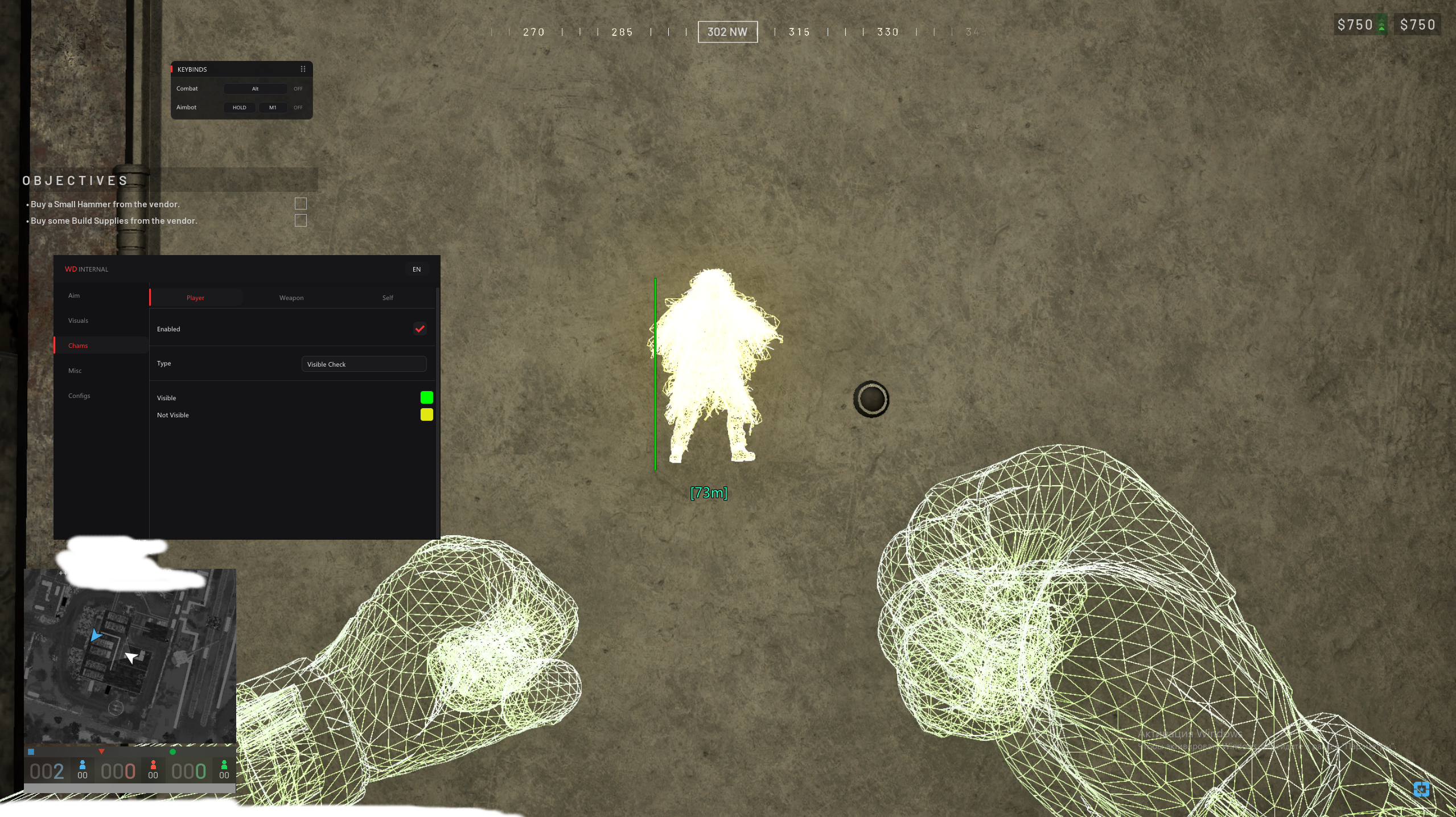
Wardogs chams change how players are highlighted. The standalone Shxdow Chams product includes a visible check and different colours for different factions. Wardogs cheats with that visual focus suit you if telling one group from another is more important than adding aim movement. Open the Chams product for that player highlighting.
The Internal Cheat also includes player, self and weapon chams, with solid and RGB options. Those visuals sit beside its aimbot and ESP features. Wardogs hacks do not all have the same Chams controls: the standalone product centres on player highlighting and faction colour, while Internal offers a wider collection of aiming and visual functions. Choose the one whose actual display matches the way you want to read an infantry fight.
Use Radar to read enemy movement beyond one view
Wardogs radar gives you a separate wider display. Shxdow Radar includes enemy and AI views, along with counts for players and downed opponents. Wardogs cheats with radar can help you see movement beyond the doorway directly ahead before you focus on one visible target. The Radar product is the destination for that view; its display does not move your crosshair.
A Wardogs radar cheat suits the approach to a fight, when you want to see enemy movement beyond your immediate view. Wardogs hacks for target acquisition become relevant once a player is in sight. That wider read can help you choose which doorway to approach before the gunfight narrows your attention to one opponent.
Follow the right Wardogs product
Looking for cheats for Wardogs that cover aim and player information together? The Internal product brings ordinary aimbot controls, player and object ESP, chams and No Recoil into one purchase. Wardogs cheats in that product fit a player who wants to acquire an infantry target and see nearby players or named objects during the same encounter.
The Wardogs internal cheat supports Steam on Windows, with specific processor, graphics and memory requirements. Wardogs cheats for PC need to fit your machine as well as your preferred feature. Chams and Radar have their own requirements, so check the product you intend to use before purchasing.
No Wardogs game cheat can promise permanent protection from detection or an account ban. Use carries account risk even when the feature suits your match. Check the relevant product's requirements before purchase, then judge its aimbot, ESP, chams or radar functions on the benefit you actually want.
Find your Wardogs cheat in the store
Choose Internal for aimbot, player ESP and the named object displays. Choose Chams for player highlighting by faction, or Radar for a wider enemy view. Wardogs cheats are easier to choose when you start with the part of the fight that frustrates you most. Open the Wardogs store page, then read the matching product's features and requirements.
Wardogs cheat questions
Do Wardogs cheats include aimbot and ESP?
Shxdow Wardogs Internal Cheat includes an ordinary aimbot, player ESP and several object ESP groups. Its aiming controls include FOV, smoothness, speed, bone choices and a target filter. The Chams and Radar products focus on different displays, so open the Internal page if you want aiming and on-screen player information together.
Does the Wardogs Chams product include an aimbot?
The standalone Chams product centres on player highlighting, faction colours and a visible check. It does not name an aimbot. Shxdow Wardogs Internal Cheat is the product with ordinary aimbot controls as well as player and object ESP. Choose Chams for its visual purpose, or read Internal if aiming is part of what you need.
Is Shxdow Wardogs Radar the same as player ESP?
No. Radar has a separate wider enemy display and player counts. The Internal Cheat's player ESP draws information about individual players, including skeleton, health, faction and distance. Radar helps with the wider positional read, while player ESP helps you read the people around your immediate fight.
Can a Wardogs cheat guarantee my account stays safe?
No. Cheat use carries account risk, and no product can guarantee protection from detection or bans. Check the requirements and current product information before purchase. Aimbot, ESP, chams and radar can change how you play, but none removes that account risk.