
How Wardogs Chams Show Players and Factions
Wardogs chams change how a character is coloured, so you can identify the player model instead of searching for a small box or name beside it. That matters when several people overlap against buildings or vegetation, where a body shape is easier to recognise than a stack of text. Faction colours add a second distinction by helping you identify which group the character belongs to.
There are two relevant products among our Wardogs cheats. Shxdow Wardogs Chams focuses on player colouring, faction colours and Visible Check. Wardogs Internal includes player chams alongside aimbot and ESP, plus separate self and weapon chams. Knowing which feature you want makes the difference between choosing a focused chams cheat and choosing the wider Internal feature set.
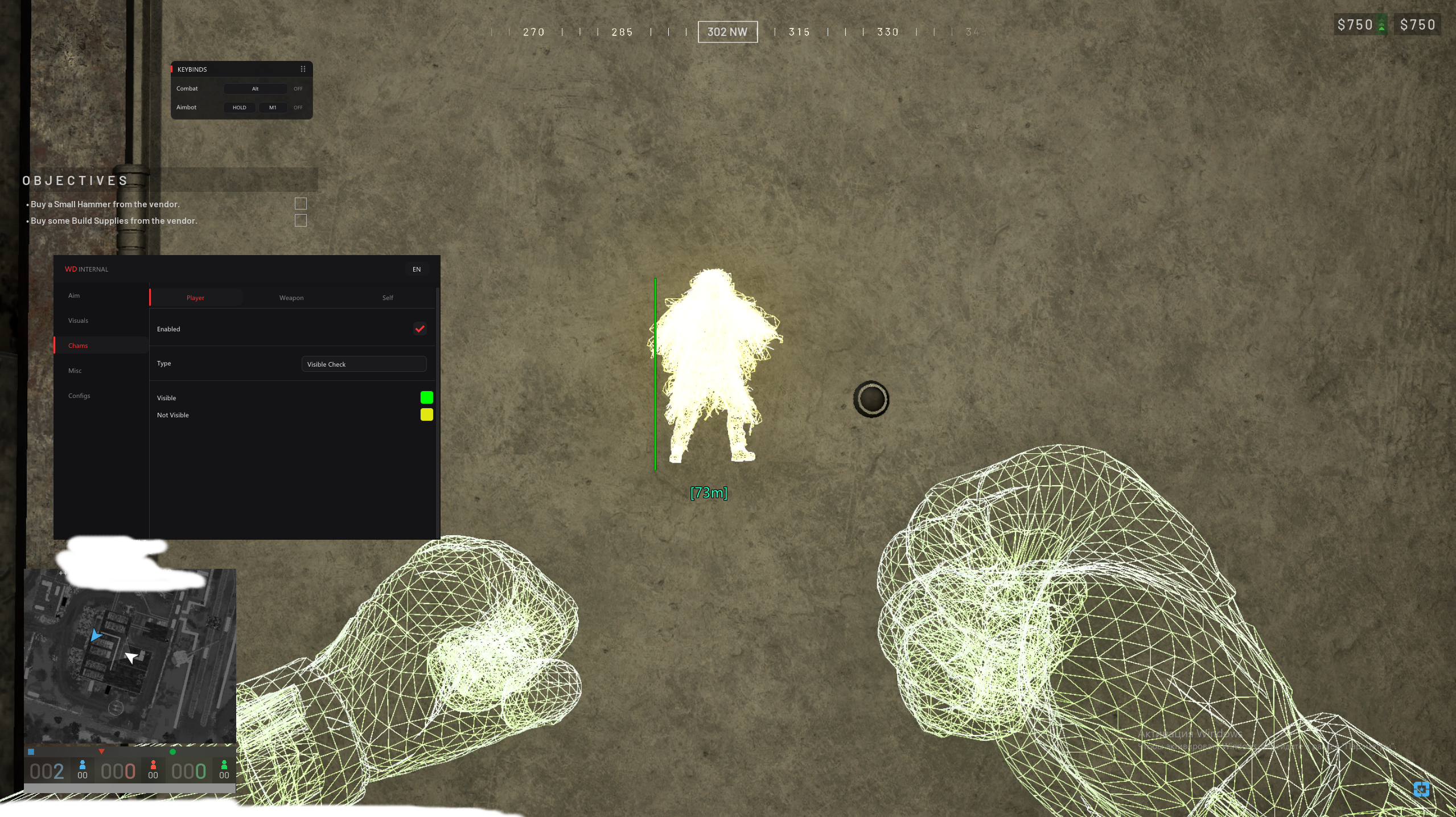
What player chams show on screen
Player chams apply colour to the character model. You follow the shape of the opponent as they move, rather than relying only on a name or distance beside them. A character turning sideways, crouching beside cover or moving behind another character changes the shape you see. The colour helps keep that shape recognisable, but you still need to understand the surrounding cover and where a shot can travel.
This is different from skeleton ESP, which draws the character's bone structure. A skeleton can make posture easier to read with less filled colour, while chams emphasise more of the body. Neither changes the actual character into a larger target. If you activate both, consider whether the skeleton contributes something useful or simply draws another layer over a silhouette you can already follow.
How faction colours help separate players
Faction colours are useful because colour alone is meaningless unless you know what it represents. Giving different factions distinct colours helps you recognise affiliations without reading every name. In a crowded Wardogs engagement, that can make it easier to separate a group near a building from another approaching along the road. Keep those colours consistent so the same colour continues to mean the same faction.
The dedicated Shxdow Wardogs Chams product explicitly includes different chams colours for different factions. Wardogs Internal also documents faction ESP as part of player ESP. These are different ways of presenting affiliation: colour on the model or faction text alongside the player. Choose the one you can read comfortably instead of covering the same opponent with repeated identification.
What Visible Check means for chams
Visible Check relates to the player's visibility from your position. It should not be confused with faction identification, health or distance. A character may belong to the same faction throughout an engagement while repeatedly moving into and out of sight. Keep those two meanings separate when reading the colours on screen, especially near doorways where visibility can change as you move a small distance.
A visibility indication is also not a statement about every part of the opponent's body. Cover and the point being checked can affect what you can actually shoot. Use the scene in front of you to judge the opening, rather than treating a coloured model as proof of an unobstructed shot. The cheat's visible-check feature describes visibility handling, not bullet penetration through the obstacle.
Player chams, self chams and weapon chams
Wardogs Internal separates player chams, self chams and weapon chams. Player chams affect player models. Self chams change your own character's appearance, while weapon chams apply the effect to your weapon. The last two do not identify an additional opponent, so they should not be mistaken for extra enemy detection when you look at a product screenshot with a brightly coloured gun or hands.
Internal documents solid chams and RGB chams for these groups. If your main reason for using chams is finding opponents, the colour of your own weapon is secondary. A bright effect across the foreground can compete with the enemy silhouette farther away. Decide how much colour you want on your own model separately from the colour that helps you distinguish other players.
Combining Wardogs chams with player ESP
Chams answer where the character is and how its model is coloured. A health bar, held item or distance ESP answers a different question. Wardogs Internal also includes head circle, view direction and off-screen arrows. Add an ESP feature because you need that specific detail, such as whether an opponent is nearby, rather than assuming every available feature should remain visible at once.
The dedicated Chams product supports Steam on Windows 10 and Windows 11, with Intel or AMD processors and the documented NVIDIA, AMD and Intel UHD graphics support. It does not require additional hardware or BIOS configuration according to its product page.
Wardogs Chams Questions
Are Wardogs chams the same as skeleton ESP?
No. Chams colour the character model, while skeleton ESP draws the character's bone structure. You can use them for related purposes, but they produce different effects on screen.
Can Wardogs chams use different faction colours?
Correct. Shxdow Wardogs Chams documents different chams colours for different factions, alongside player chams and Visible Check.
Do weapon chams show where enemies are?
No. Weapon chams change the weapon's appearance. Player chams and the relevant player ESP features are the parts that identify other characters.